

AI Doodle Dance Partner

Turn one adult photo into a short video with a white line-art version of the same person. Watch the sample, then use your own photo.

Watch example
AI Effects
AI Doodle Dance Partner Beta exampleAI Doodle Dance Partner

Make it yours

Your adult photo

or drop it here

Private to your account

Choose from History

Private to your account · Saved images up to 10 MB

Choose one adult with a clear face and visible outfit. JPG, PNG or WebP, up to 10 MB. Selecting a file keeps it on this device until you continue.

Length
10 seconds
Format
480p · 9:16 MP4
Sound
Silent

300 credits / video

From your Movelume balance

Your balance is used after you confirm. It covers the sketch and one finished video.

Checking availability… Refund policy

Beta example

AI-generated
History

Our first sample uses a fictional adult and an original line-art study. Watch the greeting and short side steps. Your generated scene and movements can differ.

  • Private to your account

    Uploaded photos and generated results never appear in a public feed.

  • Upfront credit quote

    Review the exact credit cost before any generation starts.

  • Protected balance

    Reserved credits return automatically if a request is blocked or fails.

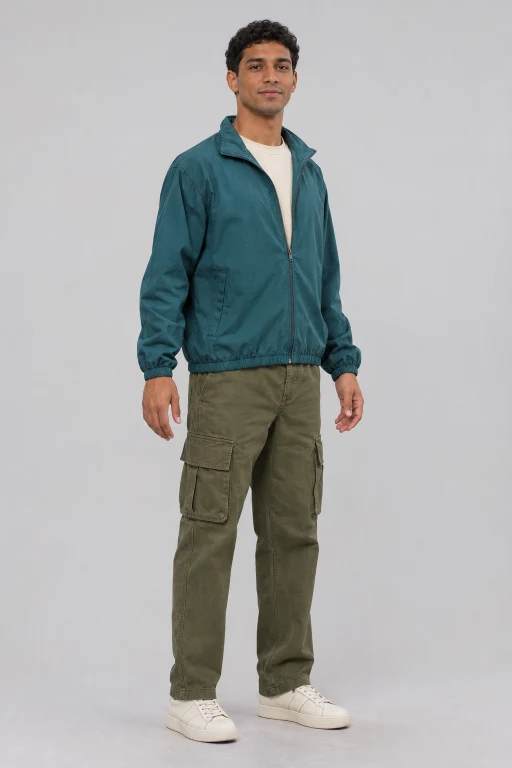
Full-body reference still of a fictional adult in a teal jacket and olive trousers
Fictional adult reference
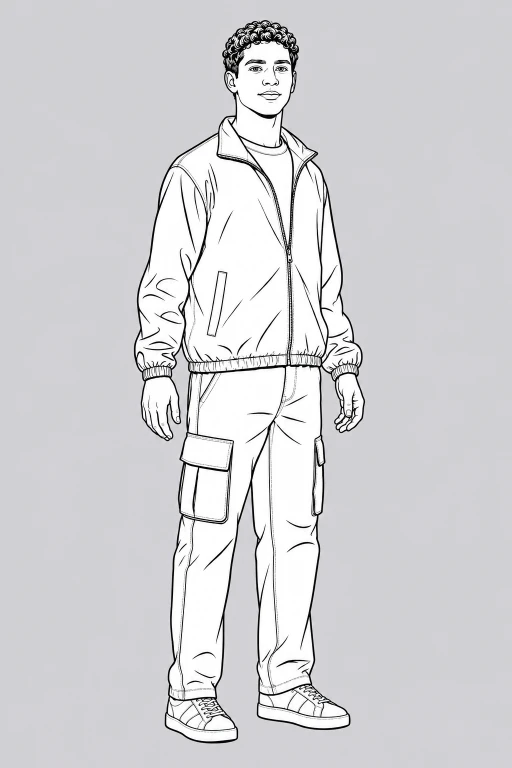
Full-body white cartoon with a black outline, matching hair shape and a simplified version of the same outfit
White line-art twin study
Still image study

What makes the doodle look like your twin?

A doodle dance partner is a white, black-outlined cartoon twin that shares the frame with the realistic person. These two stills show how the same character can read in both styles.

  • Hair shape and part

    The hairline and sweep are strong cues even when fine strands are simplified into a few strokes.

  • Jacket and outfit silhouette

    Visible layers, hems and the outline of the trousers make the pairing recognizable at full-body scale.

  • A clear space for two

    After the sketch steps into view, a short greeting gives way to side steps and arm movements.

One photo, one video

How to make a Doodle Dance Partner video

  1. 01

    Choose a clear adult photo

    Sign in and choose one adult you have permission to feature. Check the preview for an unobstructed face, recognizable hair and clothing, and enough room around the body. Replace it if the wrong person or a second face is visible.

  2. 02

    Review the credits and create

    Confirm that you have permission to use the photo, then review the 300-credit quote. Confirm it to start the video. A sketch twin is made from the same photo, so you can finish the setup with a single file.

  3. 03

    Watch and download your video

    Wait for this creation to finish, then play the full result and download the vertical MP4. If you leave while it is processing, open My creations after signing in to check the same video.

Doodle dance guide

What a doodle dance partner looks like

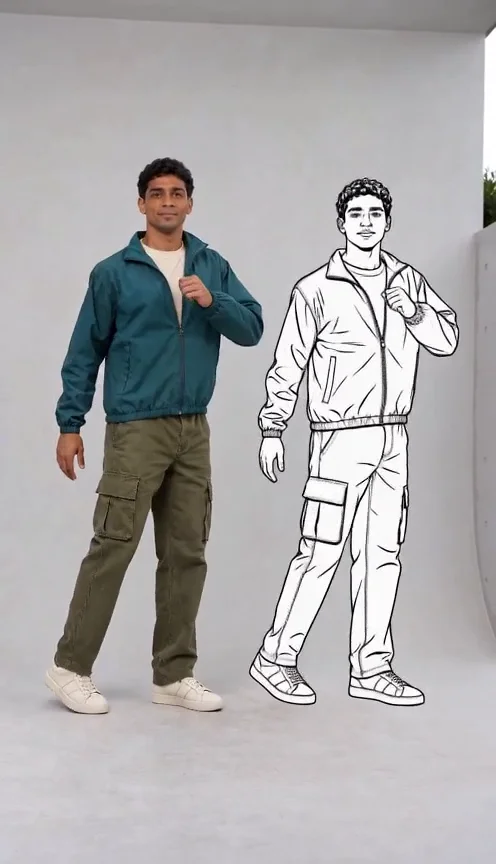
The effect puts two versions of the same adult into one newly generated shot. The live-action figure takes its appearance from the selected photo. The doodle twin has a white fill and dark ink outlines, with fewer details than the live-action figure. Hair shape, the outline of a jacket, and the difference between boots and sneakers can help the twin read as the same person. The sketch stays a separate figure with its own place to stand and move.

Play the example and pay attention to the transition from one figure to two. The first sample has the sketch peeking out, a short greeting, and a few small side steps. Watch whether you can follow the hands and tell whose feet are moving. The interaction is brief and the dancing is restrained. The sample is a good way to decide if the white line-art look and the full-body composition are what you want before you spend credits.

Doodle dance guide

Choose a photo with a recognizable silhouette

Look for a sharp photo of one adult facing the camera or turned slightly to the side. Natural light makes the face easier to read, and an outfit with a clear neckline, sleeve shape, or contrasting layers gives the sketch more to work with. When possible, choose a photo where the hands and shoes are visible. A front-facing full-body shot in a dark jacket and light pants is easier to translate into line art than a face cropped close against a similar-colored background.

A chest-up portrait can still give a clear reference for the face and hair. The generator has to infer the parts below the crop, so the trousers, shoes, height, or body proportions can differ. Choose a wider original if those details matter to the joke or the reveal. A group image, dark mirror selfie, costume mask, strong beauty filter, or strands of hair covering both eyes make it harder to carry recognizable details into a moving full-body clip.

Doodle dance guide

See how the two versions move together

The intended sequence has three moments you can judge without sound. The adult notices the sketch arriving, the two acknowledge each other, then they share a short dance. A glance toward the twin helps establish that the characters are interacting. A clear space between their hands makes the greeting easier to follow. During the dance, look at where each foot lands and whether the shoulders and hips shift with the step.

AI movement varies with the photo and the generation. The twin might peek out earlier than expected, the greeting might pass quickly, and a step might look smaller than it does in another clip. Two figures can overlap, and hands or feet can soften in motion. A vertical full-body shot gives you more room to see the choreography, while a close-up would make facial details easier to inspect. This effect uses the full-body view.

Doodle dance guide

Check the likeness after the reveal

Play the clip once at normal speed to see whether the reveal reads naturally. Then pause where both figures are clear of each other. Compare the real-looking figure with your uploaded photo and the sketch with that figure. Pay particular attention to the hairline, face shape, outfit layers, and shoe outline. Pause again after they have started moving to see whether those details survive a turn or a passing hand.

The clip is generated as a new scene and performance. Your photo guides the adult and the companion, and the sketch simplifies features that are hard to capture with a few lines. Small facial features, jewelry, clothing patterns, and proportions can change. Use it for an openly fictional dance reveal. If exact likeness or a faithful recording of a real performance matters, use the original image or footage for that purpose.

Doodle dance guide

Plan the edit around a silent vertical MP4

The finished file is about ten seconds in portrait 9:16 at 480p. It comes as a silent MP4. The opening reveal, greeting, and dance are part of the same clip, so it is worth watching all of it before trimming. If you cut the greeting too tightly, the two figures can look as if they start moving with no awareness of each other. Leave room for the feet if you crop again in a video editor.

The sample and generated clips have their own movement timing. A sound or music track you add later in an editor may need trimming or alignment to match the first side step. Choose audio you have permission to use for the platform and post you intend to make. If you want to direct a completely different scene or describe your own camera movement, explore the image-to-video workspace for its available controls.

Doodle dance guide

Credits, privacy, and unfinished videos

One finished video costs 300 Movelume credits. The public example is free to watch. Selecting a photo lets you check it locally. When you continue to review the price, the site uploads the photo so it can prepare the request. Confirm the quoted credits only when you are ready to generate. Use the balance shown for your account and visit Pricing if you need more credits.

Personal creations are accessed from the account that submitted them. Use only a photo you have permission to turn into an AI performance, and ask the featured adult before sharing the result. If the page closes or progress seems slow, check the same creation before confirming a new one. A failed generation shows its current credit status in My creations. Check the status there to see whether your credits have been returned.

Before you create

Doodle Dance Partner questions

01Do I need a second photo or dance recording?

One adult photo supplies the appearance reference for both figures. The generator creates the line-art companion and the dance. The fixed effect has no upload field for a second person, motion recording, or music track.

02Can I use an adult selfie instead of a full-body photo?

A sharp selfie with good light can provide the face and hair. A wider photo that shows the outfit and shoes gives the figure and sketch more details to preserve. Details outside the photo may be invented.

03Can I export the sketch as a separate image?

This effect delivers one MP4 with the adult and the sketch together. The two stills on the page illustrate the visual difference between the figures. Your creation is delivered as the video.

04Can I make the exact dance from a video I saw?

The effect generates its own entrance, greeting and side steps. It has no choreography or beat selector. Watch the sample to decide whether its pace and movements suit your idea.

05Where do I find my video if I leave the page?

Sign in to the same account and open My creations. Select the original video to check its status, play the finished MP4 or download it. If an earlier request is still processing, give it time before starting another.

One photo, one dance

Create a dance with your sketch twin

Start with a photo you have permission to use and review the credit cost.