Two photos · one performance reference

Hotel Lobby AI Video Studio

Upload two portraits and choose a performance to create a duet with sound. Use our original template or your own reference video. The original Hotel Lobby song is not included.

01 · Choose your two performers

One clear adult per photo. JPG, PNG or WebP · up to 10 MB and 16 MP each.

Left performer · photo 1

or drop it here

Right performer · photo 2

or drop it here

02 · Choose the performance

Orange studio duet · 10 seconds · original fictional performers and sound. Preview it before generating.

Preview reference performance

Reference for motion and sound. The people shown here are not your generated result.

03 · Review and create

Add notes (optional)

600 credits · one video with sound

Preparing uploads files for safety checks. It does not start a video or spend your generation credits. Uploaded inputs expire after 24 hours. The output follows your selected duration, which may differ slightly from the reference.

Checking account…

Two portraits. One performance.

These sample photos produced the video below. Your own result opens after generation.

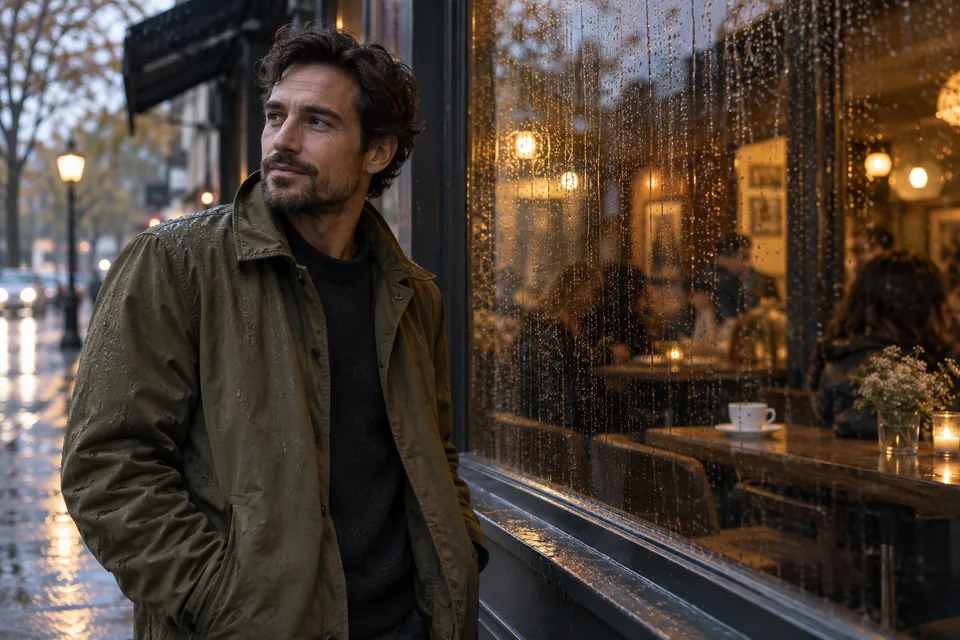
Original fictional adult man with wavy brown hair, a beard and an olive jacket, used for the left performer

LEFT · PHOTO 1

Original fictional adult woman with short brown curls and a cream sweater, used for the right performer

RIGHT · PHOTO 2

Generated example · 10 seconds · 768p. Both portraits are used in this result. The orange reference becomes a warm interior; likeness, setting, sound and lip sync can vary.
Your workflow

From two portraits to a performance video

  1. 01

    Choose the cast and reference

    Select the left and right portraits. Preview our original duet or choose your own reference video. Confirm that you have permission to use the uploaded photos, performance and sound.

  2. 02

    Prepare and review the quote

    Sign in, choose the duration and resolution, then prepare your inputs. Safety checks run before the video can start. Review the exact credit amount before confirming generation.

  3. 03

    Watch and download

    Your task opens in the normal result workspace. Completed videos appear in History and can be downloaded privately. Watch the whole clip before sharing; a still thumbnail cannot prove stable identity or motion.

Original fictional adult man with wavy brown hair, a beard and an olive jacket, used for the left performer

LEFT · PHOTO 1

Original fictional adult woman with short brown curls and a cream sweater, used for the right performer

RIGHT · PHOTO 2

Two original fictional portraits used in the video below. Each photo supplies one performer.
Two photos, two roles

Give each performer a clear identity

Use two separate portraits to cast the people in a reference performance. Photo 1 supplies the left performer and photo 2 supplies the right. These are directions to the model; review the finished video for identity drift or swapped positions.

  • One adult per photo

    Choose well-lit faces without sunglasses, heavy filters or other people. Keep facial details large enough to inspect. JPG, PNG and WebP are supported, up to 10 MB and 16 megapixels per photo.

  • Choose distinct inputs

    Different hairstyles or outfits help you compare the two roles. The generator can change clothing and facial details to fit the performance. Clear source portraits help, but they do not guarantee an exact likeness.

  • Review permission before uploading

    Use portraits with the people’s permission. Your selected photos are saved as a local draft on this device for up to 24 hours. Clear that draft when using a shared browser. Preparing a quote uploads the materials for safety checks.

Generated example · MiniMax H3 Max · 10 seconds · 768p · 600 credits. Both portraits guide the cast, and the original duet guides the gestures. This result changes the orange studio into a warm interior; faces, setting, sound and lip sync can vary. Play the full clip before choosing your inputs.
Reference the performance

Choose the movement, then check the whole result

Our original orange-studio template features two fictional adults, a suspended microphone and a short performance with sound. You can instead upload a reference video that you have permission to use. The model uses it to guide timing, gestures, framing and audio; the generated performance may vary.

  • Keep the reference simple

    Use a steady shot with exactly two visible performers. Upload a 2–15 second H.264 MP4 under 25 MB, in 16:9 or 9:16, with a constant frame rate no higher than 24 fps and a longest edge of 1920 pixels or less. Clips with cuts, variable frame rates or unsupported timing may be rejected.

  • Review the price before creating

    Choose 5, 10 or 15 seconds and 480p, 768p or 1080p. One video includes generated sound. The default 10-second, 768p creation costs 600 credits; the smallest option costs 150. Preparation does not start a video. Confirm the quote only when the inputs and settings are correct.

  • Watch both faces throughout

    Check the beginning, middle and end for swapped faces, merged hands or missing performers. Motion, audio and lip sync are model-generated and may differ from the reference. Download a result you would keep; another generation has its own cost.

Plans for image and video

Pick your plan

Choose your credits. Create images and videos with the models you need.

Starter
$14.99/ month

For casual creators testing top image and video models every month.

1,400
$0.0107/cr
credits every 30 days
~70
1K images / filters
~14
Omni 4s videos

Or ~3 Seedance 2.0 5s clips (380 cr each)

  • 1,400 credits refresh every 30 days
  • 2 generations at once
  • New results saved for 30 days
  • Subscription credits expire at each refresh
  • Cancel anytime
  • Private results and generation history
ProMost popular
$34.99/ month

For active creators shipping content weekly with 4 parallel jobs.

3,500
$0.0100/cr
credits every 30 days
~175
1K images / filters
~35
Omni 4s videos

Or ~9 Seedance 2.0 5s clips (380 cr each)

  • 3,500 credits refresh every 30 days
  • 4 generations at once
  • New results saved for 90 days
  • Subscription credits expire at each refresh
  • Cancel anytime
  • Private results and generation history
Max
$79.99/ month

For studio volume, 365-day retention, and Seedance 2.0 4K access.

8,200
$0.0098/cr
credits every 30 days
~410
1K images / filters
~82
Omni 4s videos

Or ~21 Seedance 2.0 5s clips (380 cr each)

  • 8,200 credits refresh every 30 days
  • 6 generations at once
  • New results saved for 365 days
  • Seedance 2.0 4K access · credits charged per generation
  • Cancel anytime
  • Private results and generation history

Subscriptions renew automatically at the selected monthly or yearly rate until canceled. Cancel future renewals in your account.

Video counts are estimates for the settings above, not a separate allowance. Other models and settings use different credits. Review the exact quote before generating.

Pay safely and securely with

  • Visa
  • American Express
  • Apple Pay
  • UnionPay
  • Google Pay
  • JCB
  • Discover
No subscription · Pay once

Starter Pack: $9.90 once · 600 credits

Valid 365 days with zero recurring billing ($0.0165/cr). Covers ~30 1K images or GTA 6 filters, or 6 default 4s Gemini Omni videos.

Compare what is included
Plan benefitFreeStarterProMax
Monthly billing$0$14.99$34.99$79.99
Annual billing · paid upfront$0$143.88$335.88$767.88
Annual equivalent per month$0$11.99$27.99$63.99
Credits every 30 days25 once · eligible new users1,4003,5008,200
Simultaneous generations1246
New result storage30 days30 days90 days365 days
Seedance 2.0 4K accessNot includedNot includedNot includedIncluded · credits apply
Private results and historyIncludedIncludedIncludedIncluded

Subscription credits refresh every 30 days, expire at the end of that window, and do not roll over. Annual billing does not issue all yearly credits upfront.

Storage is set when a result is generated. Upgrading does not extend the storage period of older results. Download files you want to keep.

The Max requirement applies to Seedance 2.0 4K. Nano Banana 2 4K does not require Max; your selected model and settings determine the credit quote.

Anyone can buy 600, 1,800, or 5,000 one-time credits with no subscription required. Packs remain valid for 365 days.

Fixed-result templates have their own cash or credit options on each template page. A subscription does not include every $9.90 finished video.

The signup grant is one-time and subject to eligibility. Local drafts are free; daily check-in rewards are separate. Generation requires enough valid credits for the exact quote.


Loading payment options…

Prices are in USD. Subscriptions renew automatically; credit packs are one-time purchases.

Before you start

Hotel Lobby AI video questions

01Does this include the original Hotel Lobby song or performance?

No. The included orange-studio duet is original generated material with fictional performers and sound. You can upload reference material you have permission to use. The tool does not supply the original recording, and it does not promise an exact copy of a song, choreography or mouth movements.

02Can I make a completed video for free?

Previewing the template and choosing files does not spend generation credits. Video generation requires an account and enough credits for the confirmed quote. Prices start at 150 credits; longer or higher-resolution outputs cost more.

03How closely does it follow the reference?

The reference guides the model’s performance. Facial identity, left/right roles, motion, audio and lip sync can vary. Review the full result before sharing and do not present a generated clip as a real recording of the people in your photos.

04Where are my uploaded files and results stored?

Uploaded inputs are private, checked before generation and expire after 24 hours. They are supplied to the generation provider only for processing your request. Results use your normal account workspace, History and plan-based retention. Download results before the expiry shown on the result page.

05Why was my reference video rejected?

Use a readable, constant-frame-rate H.264 MP4 that meets the size, duration and format limits shown above. Unsupported timing or safety-check failures can prevent acceptance. Preparing a rejected input does not start a paid video. Export a compatible clip or choose the original template.

06What if a submission response is lost?

Check History first. The Check submission button recovers the same request rather than creating a replacement generation. Keep the page open until the task is confirmed; do not repeatedly start new requests.

Your next step

Cast your duo in a reference performance

Start with two clear portraits and a performance you have permission to use. Preview the reference, review the price and check the full result.