

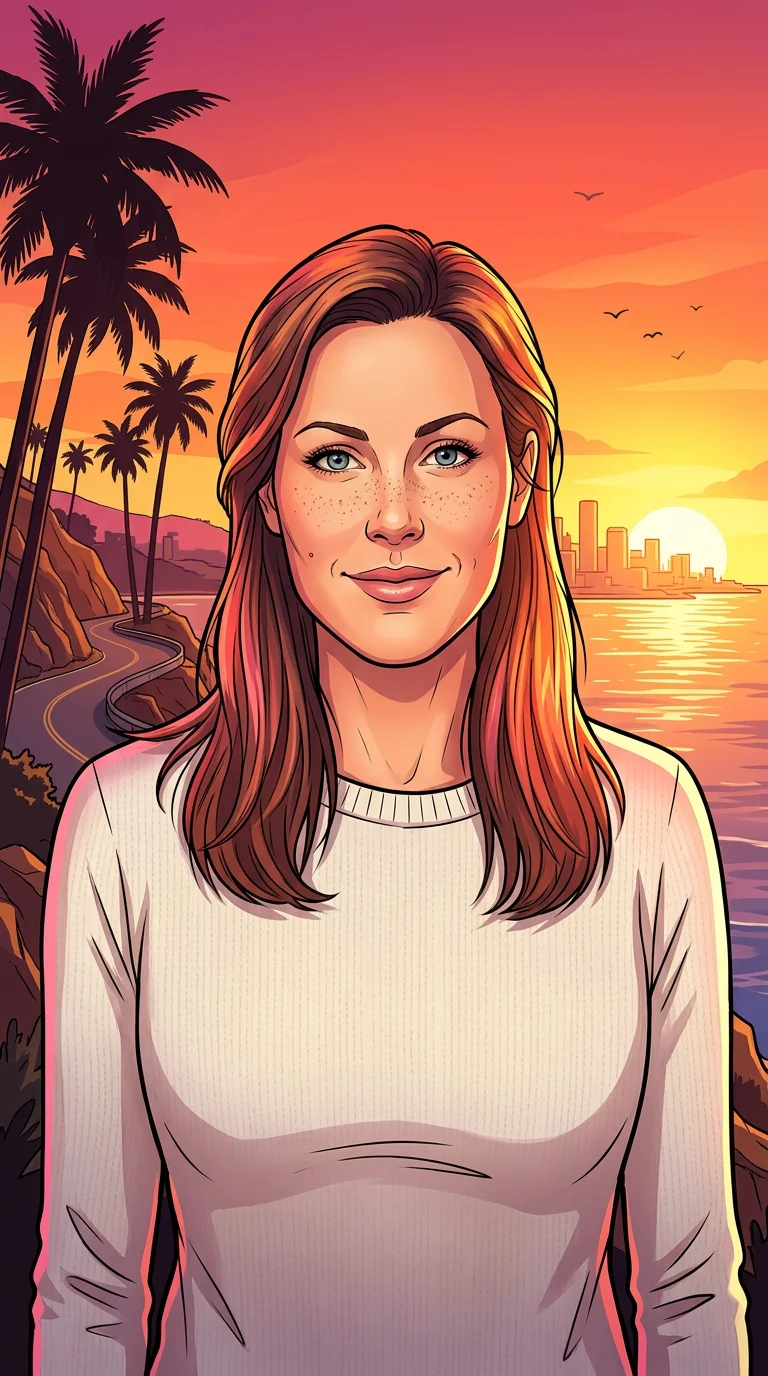
 Real exampleNeon Sunset Poster
Stylized open-world poster effect
GTA 6 AI photo filter
Turn one clear adult photo into a GTA 6 style poster or loading screen PNG.
20 credits per preview · 1K PNG · Eligible new accounts start with 25 free credits (covers your first preview)
or drop it here
Private to your account
One adult or two adults with clearly visible faces. Use a sharp photo you own or have permission to edit, in ordinary everyday clothing. JPG, PNG or WebP up to 10 MB.
Private to your account · Uploaded source images remain available for up to 24 hours · Not used to train Movelume models. Privacy policy
Choose your look
Selected: Neon Sunset Poster. Every preset starts from your original photo. Lighting, brushwork, wardrobe styling and backdrop shift into an illustrated poster look. Check facial likeness before keeping your download.
Checking account…
Every preview uses 20 credits (eligible new accounts start with 25 free credits, or grab 600 credits for $9.90 once). Plans & credits
Real example
Sample poster looks
Published examples (not your result). Choose a photo to preview yours.
Independent stylized open-world game poster photo effect; not affiliated with, endorsed by, or officially connected to Rockstar Games or Take-Two Interactive.
Private to your account
Uploaded photos and generated results never appear in a public feed.
Upfront credit quote
Review the exact credit cost before any generation starts.
Protected balance
Reserved credits return automatically if a request is blocked or fails.
Three illustrated looks, one clear photo
How to apply the GTA 6 AI photo filter
- 01
Upload a clear single or two-person adult photo
Choose one JPG, PNG or WebP image up to 10 MB showing one adult or two adults with well-lit, unoccluded faces. Use a sharp photograph you own or have permission to edit, wearing ordinary everyday clothing. A head-and-shoulders or upper-body portrait leaves clear facial landmarks so you can judge likeness once the illustration style is applied. Avoid tiny background figures, heavy social filters, masks or cluttered group shots.
- 02
Select a preset and review the 20-credit quote
Pick Neon Sunset Poster, Loading Screen Art or Coastal Vice Portrait. You do not need to write a manual GTA 6 style photo prompt, adjust lighting sliders or pick an underlying model. Sign in, check the upfront 20-credit quote and confirm when you are ready to generate. Each preview produces one still PNG at around 1K resolution; testing a second visual direction from your photo starts a separate 20-credit preview.
- 03
Compare facial likeness and download your PNG
Use the comparison slider to inspect the original photograph alongside the stylized poster artwork. Check eyes, brows, nose, jawline, glasses and hairlines before saving your PNG. To compare another aesthetic, return to the original upload rather than feeding an already stylized image back into the tool. Chaining painted outputs can soften facial detail and drift away from the person in your source photo.
AI-created adult portrait, Neon Sunset Poster preview
 OriginalAI preview
Drag to compare · Arrow keys supported
Neon Sunset Poster
Golden-hour skyline warmth with bold cover-art contrast
Neon Sunset Poster turns an everyday portrait into a warm twilight cover illustration framed by coral skies, palm silhouettes and glowing coastal horizon light. It aims to carry the energy of a classic open-world game poster while keeping your subject recognizable at the center of the composition.
Judge likeness under warm illustrated shading
Painted sunset highlights naturally warm up skin tones and sharpen cheek and jawline contours. When inspecting the result with the comparison slider, focus first on eye spacing, brow expression, lip shape and overall head proportions rather than surface color alone. A strong sunset palette works best when the person remains immediately recognizable to friends without needing a caption. Warm orange and magenta rim light can also change how jackets, collars and hair edges catch brightness. Check where the shoulder outline meets the palm skyline and make sure eyeglasses, earrings or hair parts did not vanish or warp during stylization. Because this look shifts real-world daylight into golden dusk, treat the image as stylized poster artwork rather than an accurate color portrait.
When this preset fits best
Choose Neon Sunset Poster when your original photo has neutral or flat indoor lighting and you want dramatic cover-art atmosphere. Solo selfies, relaxed car-window portraits and two-person shoulder-to-shoulder shots read cleanly once simplified into warm sunset shapes. If your photo already carries harsh colored club lights, a cleaner daylight source usually yields steadier facial structure.
AI-created adult portrait, Loading Screen Art preview
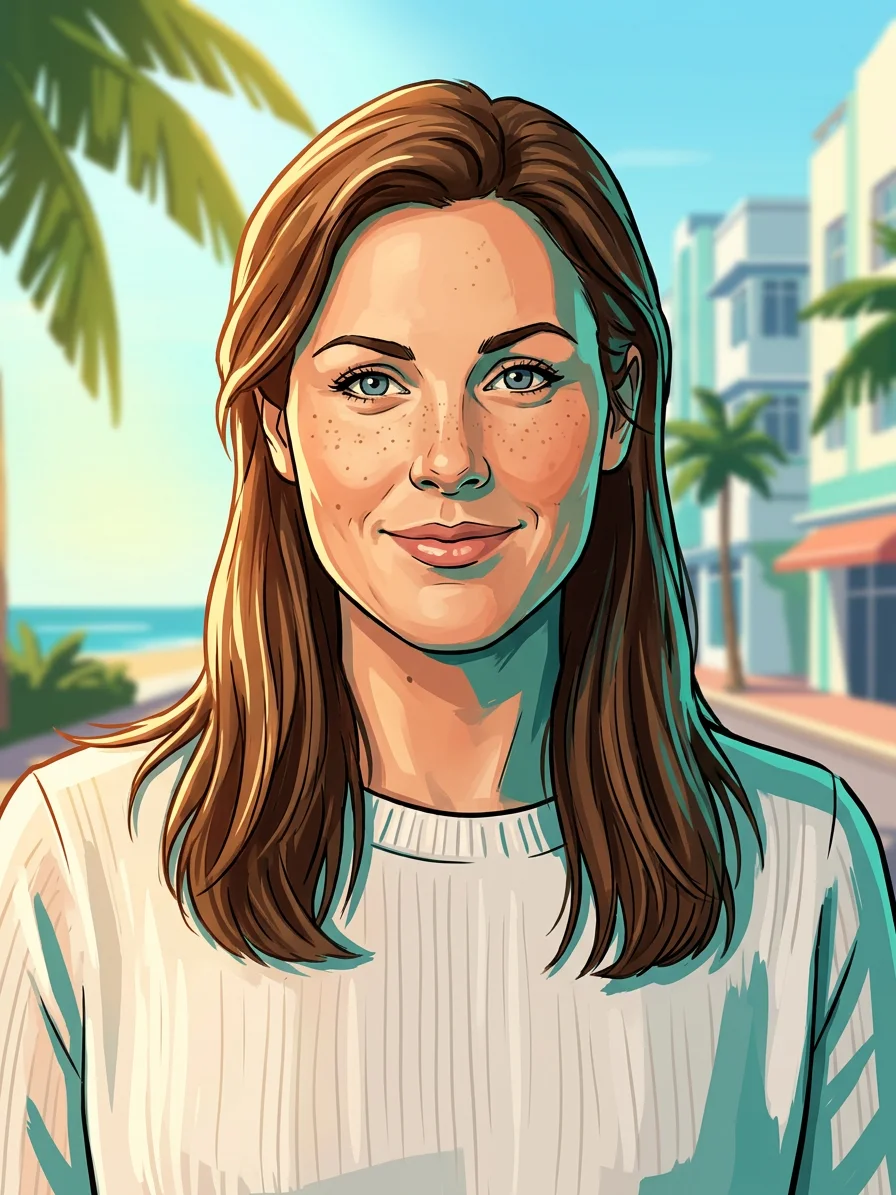 OriginalAI preview
Drag to compare · Arrow keys supported
Loading Screen Art
Crisp cel-shaded character art without writing a prompt
Many people search for a GTA 6 prompt or paste long style instructions into general image tools only to end up with distorted faces or generic comic ink. Loading Screen Art pairs curated cel-shaded brushwork with balanced tropical daylight shadows so you can test the look reliably in one click.
Built-in direction instead of prompt guesswork
Searching for a workable GTA 6 style photo prompt often leads to trial-and-error edits that over-stylize skin, invent sunglasses or insert unwanted props. Selecting Loading Screen Art skips the prompt guesswork while keeping your upload private to your Movelume account. You review the exact credit cost upfront, generate one consistent illustration and evaluate the result directly beside your original. If you later want to customize specific background landmarks, weather, aspect ratios or written scene instructions beyond these three curated presets, open the Movelume Image Studio to write your own prompt with full model controls. This dedicated page stays focused on fast, repeatable portrait-to-poster previews with predictable output formatting.
How single and two-person portraits compare
Loading Screen Art handles both solo adult portraits and side-by-side two-person photos, provided both faces are crisp and evenly spaced in the frame. Check both subjects individually at full width: make sure neither person borrowed the other’s expression or glasses, and confirm hands or shoulders remain cleanly separated against the palm-lined boulevard backdrop.
AI-created adult portrait, Coastal Vice Portrait preview
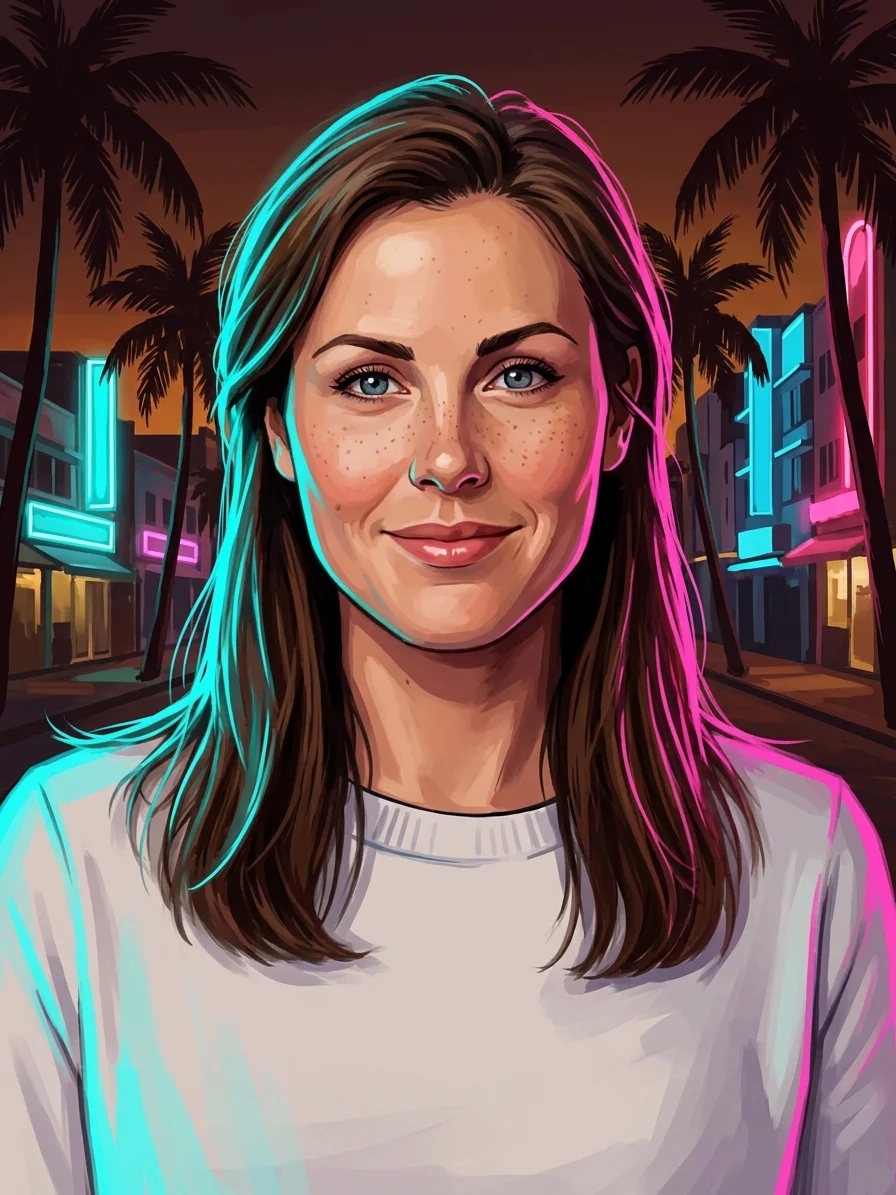 OriginalAI preview
Drag to compare · Arrow keys supported
Coastal Vice Portrait
Twilight neon avenues with electric cyan and pink edge light
Coastal Vice Portrait shifts the mood into humid nightfall, wrapping hair, collars and jacket seams in crisp cyan and hot-pink neon reflections against a softly blurred oceanfront avenue. It suits nightlife profile pictures, music cover concepts and stylized duo portraits.
Check dark shadows, hairlines and neon spill
High-contrast night lighting pushes midtones deeper while highlighting edges in vivid electric hues. After generation finishes, zoom in on dark hairlines, pupils and shaded cheeks to confirm facial features did not flatten into murky shadows. Notice how neon cyan and pink catch collar edges and glasses frames: a balanced edit adds atmospheric glow without obscuring eye contact. When comparing two subjects in one frame, verify that cool cyan light on one side and warm pink reflections on the other still respect each person’s natural skin undertones and age. Minor brushwork simplification on shirts or distant beachfront buildings is expected for illustrated key art, whereas warped noses, missing frames or extra background figures are signs to try a clearer source photo.
Keep creative sharing clear and transparent
Stylized game-poster edits work well for gaming avatars, Discord banners, streaming thumbnails and lighthearted social posts. When sharing an output where viewers might wonder whether an image is official promotional artwork or a real photograph, label it clearly as an AI-stylized edit. Check the downloaded PNG dimensions at full size before printing posters or cropping tight avatar thumbnails.
Photo prep & scope
What photos work best and what this effect does not do
Prepare a clean portrait before confirming
Use an uncompressed or lightly compressed photo where eyes, eyebrows, nose and mouth sit clearly inside the frame. Front-facing or gentle three-quarter angles preserve likeness far better than extreme side profiles or heavy downward shadows. Keep hair or sunglasses out of the eyes if you want the expression to remain faithful, and avoid strong beauty filters that already erase natural facial structure.
For two-person photos, choose a shot where both adults stand close at roughly the same distance from the lens. One person standing far in the blurred background loses facial detail before generation even starts. Only upload photos of adults in ordinary everyday clothing that you own or have permission to transform.
Independent poster filter, not an official game tool
This is an independent stylized open-world game poster photo effect; not affiliated with, endorsed by, or officially connected to Rockstar Games or Take-Two Interactive. It produces one static illustrated PNG in your browser rather than an animated video, game mod, playable character skin or official promotional cover.
This tool is intended for ordinary clothed adult portraits only. Do not upload photos involving minors, explicit nudity, weapons, violence or non-consensual likenesses, as outlined in the Acceptable Use Policy. If you need video motion from an image instead of a still poster, explore Movelume’s dedicated video workflows.
Plans for image and video
Pick your plan
Choose your credits. Create images and videos with the models you need.
Starter
$14.99/ month
For casual creators testing top image and video models every month.
1,400
$0.0107/crcredits every 30 days
~70
1K images / filters
~14
Omni 4s videos
Or ~3 Seedance 2.0 5s clips (380 cr each)
- 1,400 credits refresh every 30 days
- 2 generations at once
- New results saved for 30 days
- Subscription credits expire at each refresh
- Cancel anytime
- Private results and generation history
ProMost popular
$34.99/ month
For active creators shipping content weekly with 4 parallel jobs.
3,500
$0.0100/crcredits every 30 days
~175
1K images / filters
~35
Omni 4s videos
Or ~9 Seedance 2.0 5s clips (380 cr each)
- 3,500 credits refresh every 30 days
- 4 generations at once
- New results saved for 90 days
- Subscription credits expire at each refresh
- Cancel anytime
- Private results and generation history
Max
$79.99/ month
For studio volume, 365-day retention, and Seedance 2.0 4K access.
8,200
$0.0098/crcredits every 30 days
~410
1K images / filters
~82
Omni 4s videos
Or ~21 Seedance 2.0 5s clips (380 cr each)
- 8,200 credits refresh every 30 days
- 6 generations at once
- New results saved for 365 days
- Seedance 2.0 4K access · credits charged per generation
- Cancel anytime
- Private results and generation history
Subscriptions renew automatically at the selected monthly or yearly rate until canceled. Cancel future renewals in your account.
Video counts are estimates for the settings above, not a separate allowance. Other models and settings use different credits. Review the exact quote before generating.
Pay safely and securely with





No subscription · Pay once
Starter Pack: $9.90 once · 600 credits
Valid 365 days with zero recurring billing ($0.0165/cr). Covers ~30 1K images or GTA 6 filters, or 6 default 4s Gemini Omni videos.
Compare what is included
| Plan benefit | Free | Starter | Pro | Max |
|---|---|---|---|---|
| Monthly billing | $0 | $14.99 | $34.99 | $79.99 |
| Annual billing · paid upfront | $0 | $143.88 | $335.88 | $767.88 |
| Annual equivalent per month | $0 | $11.99 | $27.99 | $63.99 |
| Credits every 30 days | 25 once · eligible new users | 1,400 | 3,500 | 8,200 |
| Simultaneous generations | 1 | 2 | 4 | 6 |
| New result storage | 30 days | 30 days | 90 days | 365 days |
| Seedance 2.0 4K access | Not included | Not included | Not included | Included · credits apply |
| Private results and history | Included | Included | Included | Included |
Subscription credits refresh every 30 days, expire at the end of that window, and do not roll over. Annual billing does not issue all yearly credits upfront.
Storage is set when a result is generated. Upgrading does not extend the storage period of older results. Download files you want to keep.
The Max requirement applies to Seedance 2.0 4K. Nano Banana 2 4K does not require Max; your selected model and settings determine the credit quote.
Anyone can buy 600, 1,800, or 5,000 one-time credits with no subscription required. Packs remain valid for 365 days.
Fixed-result templates have their own cash or credit options on each template page. A subscription does not include every $9.90 finished video.
The signup grant is one-time and subject to eligibility. Local drafts are free; daily check-in rewards are separate. Generation requires enough valid credits for the exact quote.
Loading payment options…
Prices are in USD. Subscriptions renew automatically; credit packs are one-time purchases.
Before you try
GTA 6 AI photo filter FAQ
01How much does the GTA 6 AI filter cost?
Each generated poster preview costs 20 Movelume credits and returns one PNG image at around 1K resolution. Sign in and review the exact credit quote before confirming generation. Testing another preset or uploading another photo uses another 20 credits. Compare available plans and credit packs on Pricing; every preview requires 20 credits on this image tool and is billed separately from single-video template purchases.
02Do I need to write a GTA 6 prompt to use this tool?
No. Choose Neon Sunset Poster, Loading Screen Art or Coastal Vice Portrait and upload your photo—the visual direction is built into each preset so you do not need to hunt for a GTA 6 style photo prompt. If you want to write custom scene prompts, choose different aspect ratios or test other image models, switch to the Movelume Image studio.
03Will my face stay recognizable in the poster style?
The effect aims to preserve each adult’s recognizable facial likeness, age, skin tone and glasses state while translating lighting and textures into painted game key art. Exact preservation is not guaranteed, because bold cel shading and stylized rim lighting alter surface details. Compare your result side by side with the slider before downloading.
04Can I upload a couple or two-person photo?
Yes, you can upload either a clear single-adult portrait or a two-person adult photo where both faces are sharp and unobstructed. Avoid large crowds, distant faces or photos containing minors. Keep ordinary everyday clothing, and do not upload photos depicting weapons, violence or explicit material.
05Is this an official Rockstar Games or GTA 6 app?
No. This is an independent stylized open-world game poster photo effect; not affiliated with, endorsed by, or officially connected to Rockstar Games or Take-Two Interactive. It creates a single still PNG illustration inspired by coastal poster aesthetics, not an official game asset, mod or video clip.
06Are my uploaded photos and poster results kept private?
Your uploaded source photos and generated PNG downloads remain private to your signed-in Movelume account and are never posted to a public showcase feed. Save a local copy before the availability date shown on your task result. Review the linked Privacy Policy and Acceptable Use Policy for retention and safety details.
07What happens if a request is blocked or my connection drops?
If a request is blocked before generation starts, no generation credits are spent; if a generation confirms as failed, reserved credits return to your balance. If the connection drops right after confirmation or the outcome is not yet settled, click Find my request or check your generation history and credit status before trying again, and contact support if the task remains unresolved.
Make your comparison
Turn your photo into a coastal poster
Start with a sharp single or two-person adult portrait and pick one of the three illustrated looks.